Jersey의 JSON Support

Posted at 2009/06/08 13:57// Posted in 나만의 작업
Jersey에서 JSON을 지원하는 방법은 두가지가 있다.

* JAXB Based JSON support
* Low-Level JSON support


일단, JAXB 기반의 JSON 지원하는 방법을 알아보면,

JSON하고 XML data format을 쉽게 produce/consume하면 시간절약을 할 수 있다.
왜냐면 Java model, JAXB를 이용한 annotated된 POJO를 쓰기때문에 쉽게 핸들링할 수 있다.

자바 모델에 @XmlRootElement 어노테이션을 붙여주고 간단한 몇가지 작업을 해주면~ 큰 노력하지 않고
JSON을 지원할 수 있다. 

단점은 매우 특별한 JSON format을 처리할 때 좀 어렵다는거.옵션을 줘야한다.

위의 글에서 자세한 내용을 참고~


두번째 방법인 Low-Level JSON support
JSONObject나 JSONArray를 이용. Jettison project 를 이용
가장 큰 이점은 JSON format의 produced나 consumed을 full로 컨트롤할 수 있다. 직접 사용자가 원하는데로 쓰기때문에.. 반면에 data model object를 다룰때 JAXB기반보다는 좀더 복잡하다
간단한 JSON의 경우 JAXB를 쓸 경우엔 한줄로 끝나지만 JSONObject를 생성해서 쓰면 꽤 여러줄을 코딩해야 한다. 

JAXB bean creation

MyJaxbBean myBean = new MyJaxbBean("Agamemnon", 32);


Constructing a JSONObject

JSONObject myObject = new JSONObject();
myObject.JSONObject myObject = new JSONObject();
try {
   myObject.put("name", "Agamemnon");
   myObject.put("age", 32);
   } catch (JSONException ex) {
   LOGGER.log(Level.SEVERE, "Error ...", ex);
  }

간단한 경우엔 JAXB를..조금 섬세한 작업이 필요하다면 JSONObject를 쓰는것이 좋을 것 같다.
JAXB에서 configuration 설정은 지금보다 더 섬세한 작업을 할 수 있게 지원해준다면 좋을텐데...

참고!! 및 주의!!

그리고 현재 많이 보이는 글들중 JAXB를 조금 더 세세하게 옵션을 줘서 표현하는 방법에 ContextResolver<JAXBContext> 인터페이스를 구현하여 자신만의 JSONJAXBContext에 옵션을 주는 방법에
  @Provider
   public class MyJAXBContextResolver implements ContextResolver<JAXBContext> {

       private JAXBContext context;
       private Class[] types = {StatusInfoBean.class, JobInfoBean.class};

       public MyJAXBContextResolver() throws Exception {
           Map props = new HashMap<String, Object>();
           props.put(JSONJAXBContext.JSON_NOTATION, JSONJAXBContext.JSONNotation.MAPPED);
           props.put(JSONJAXBContext.JSON_ROOT_UNWRAPPING, Boolean.TRUE);
           props.put(JSONJAXBContext.JSON_ARRAYS, new HashSet<String>(1){{add("jobs");}});
           props.put(JSONJAXBContext.JSON_NON_STRINGS, new HashSet<String>(1){{add("pages"); add("tonerRemaining");}});
           this.context = new JSONJAXBContext(types, props);
       }

       public JAXBContext getContext(Class<?> objectType) {
           return (types[0].equals(objectType)) ? context : null;
       }
   }


이런식으로  JSONJAXBContext.JSON_NOTATION 등의 상수들이 모두 deprecated 되었다.
Jersey 1.0.2 부터는 아래처럼 변경되었다.

   @Provider
   public class MyJAXBContextResolver implements ContextResolver<JAXBContext> {

       private JAXBContext context;
       private Class[] types = {StatusInfoBean.class, JobInfoBean.class};

       public MyJAXBContextResolver() throws Exception {
           this.context = new JSONJAXBContext(
                   JSONConfiguration.mapped()
                                      .rootUnwrapping(true)
                                      .arrays("jobs")
                                      .nonStrings("pages", "tonerRemaining")
                                      .build(),
                   types);
       }

       public JAXBContext getContext(Class<?> objectType) {
           return (types[0].equals(objectType)) ? context : null;
       }
   }


이올린에 북마크하기(0) 이올린에 추천하기(0)
  1. [NC]...YellOw
    2009/06/10 21:10 [Edit/Del] [Reply]
    날이 점점 더워지고 있네요. 더위 조심하세요~~

댓글을 남겨주세요

Name *

Password *

Link (Your Homepage or Blog)

Comment

Secret

XML to JSON

Posted at 2007/11/24 00:30// Posted in 나만의 작업

예전에 만들어놓은 XML파일을 JSON 형식으로도 만들어주기 위해
XML을 JSON으로 바꾸는 작업을 하다가,
XML을 흔히 JSON으로 많이 바꾸지 않나,, 그러면 뭔가 툴이 있지 않을까?

하고 구글신께 여쭈어보니,
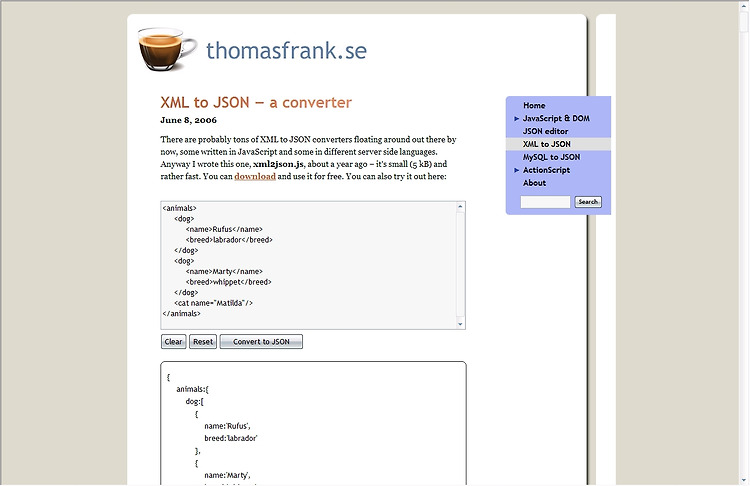
아주 깔끔한 Javascript parser가 있습니다.

Thomas Frank 분이 만드신거 같은데,
블로그에 가보니 아주 편리하게 XML을 넣으면 JSON으로 바꾸어 결과를 보여줍니다.

사용자 삽입 이미지


Javascript를 다운로드 할 수 도 있습니다.
GNU 에 의한 free software입니다. 소스를 받아보니 170줄의 코딩이 있더군요

제가 간단한 XML을 넣어본 결과 JSON으로 잘 변환해줍니다.

하지만, depth가 깊은 XML은 테스트 안해봐서 잘은 모르겠지만,
당분간은 유용할 듯 합니다~

부록으로 JSON Editor도 있습니다.


이올린에 북마크하기(0) 이올린에 추천하기(0)
  1. 2007/11/26 11:38 [Edit/Del] [Reply]
    여기 올때마다 새로운 기술을 만나네요......
    멋져요.
  2. 2007/11/28 23:42 [Edit/Del] [Reply]
    버리님 이렇게 열공하시는 거 보니 대단하심과 동시에 제 자신이 부끄럽네요... ^^;;
  3. 2007/12/02 13:05 [Edit/Del] [Reply]
    일에 대한 열정이.. 부럽네요 ^-^

댓글을 남겨주세요

Name *

Password *

Link (Your Homepage or Blog)

Comment

Secret